Showing posts with label computer. Show all posts

Wednesday, December 12, 2012

How To Upgrade Memory on Macbook

Equipment required is:
Macbook White Unibody

Steps to upgrade memory module on Macbook:
  1. Open to the eight bolts as shown below
    MacBook Cover
    MacBook Cover

    MacBook Cover
  2. Unplug the power connection from the battrey on mainboard, note the picture below is very important every will open the part of MacBook
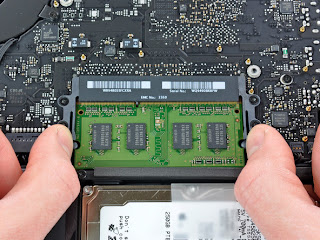
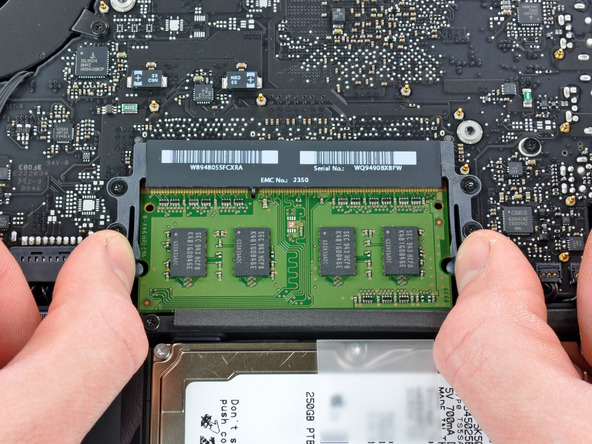
  3. Press the hook to the side out on each side of the RAM slot, note the picture below

  4. Then you can change the another RAM/memory module
May be useful :D

Saturday, April 16, 2011

Hard Drive Repair - Recover Hard Drive Data


Almost everyone relies on their computers and hard drives to store their important pictures. Some even keep their important memories like the first picture of their daughter running on their hard drives. Danger save the pictures on your drive was that it was not safe at all. In a brief moment, the worst could happen and may accidentally deleted files. And if it does not apply and you feel that free all is lost, the data recovery is still going to give a glimmer of hope.

It's good to know that unlicensed even though a great misfortune applies to your computer, big sebahagian the data or files still may be found at your drive. Soalan for many people is how to recover deleted files-these files in your hard drive? Basically, you have two options to choose from. The first is always the most safe way and that is to let the experts handle the job. Bring your hard drive to a data recovery center and let them do the hard work. Data recovery is a very difficult task that will require expert knowledge in data recovery. It offers less risk in recovering and restoring your important fail-fail.

The second option is to do its own recovery. For someone who is good at computers and can follow instructions, this is a cheaper option kerana they do not have to pay for the services of experts. Unfortunately not everyone is good at the computer can perform difficult tasks to restore files abolished. Danger perform data recovery by yourself is lost eternally fail. At the end instead of helping yourself to get the files you want, you end up doing more kerosakan and eternally lost files. This is an important consideration to remember when doing recovery.

After thinking through and you decide that free you are able to recover files from your hard drive dipadam, so step is to find a program that will help you perform this complex task. There are programs and freeware that can be downloaded via the Internet. Several free programs are more complex but comes with a cost. The advantage of using a program that will menjimatkan kerana wang you do not need to hire or pay a data recovery expert to recover files deleted from your hard drive. For many, this is a smart idea since the program can do almost the same perkhidmatan not experts.

But again, it should be stressed that free recover deleted files from your hard drive is a commercial complex and risky. Someone who is not good or proficient with the computer should be trying to stay away from studying or circumvent the huge task of data recovery. Also, not all programs to do it yourself data recovery may be used for all kinds of lost data or files deleted. Examples of when the drive is the physical rosak. But for simple things recover deleted files from hard drives are very good, software that is most capable of working. You only need to be very careful when doing the recovery yourself to circumvent more merosakkan cakera you that will make it more difficult to recover files that dipadam or may even turn into the worst loss you fail eternally.

Article Source: http://EzineArticles.com/6168535

HTML5 Canvas element


One of the existing development on the HTML 5 is the Canvas element. HTML5 Canvas element is a miracle that allows web designers to embed interactive visual images via the HTML language. With a variety of credit attributes, providing the output is quite similar to the original web software used in the preparation of dynamic images and animation.

How does it work?

A wide assortment of methods and properties bring life into a web page using the canvas element. To draw a rectangle, gradient fill and transformation to scale and rotate, JavaScript is used. Bezier curves and arcs can also be integrated to obtain the desired interface.

Such as image tags, canvas elements using attributes such as width and height. Id is required to identify with JavaScript or other scripting language. By defining the canvas tag in this way, the layout is rendered invisible on web pages. The elements of style sheets such as borders, background colors or margins help reveal the true picture of the canvas on the screen. Standard color is always black. Tags using a color attribute to use RGB or hexadecimal value.

To create fillRect rectangular (x, y, w, h) the syntax used to create a rectangle on the screen when strokeRect (x, y, w, h) defines the use of border or stroke. fillStyle () and strokeStyle () sets form a pattern, specific colors and gradients. x and y coordinates are assigned values. The size of the value indicated by w and h. Some roads with a few strokes can be made on line beginPath () and closePath () at the beginning and end of the road. As the gradient rectangle, diagonal or other also has four arguments in which the two first shows the starting point and the last two end points of the gradient. However, the radial gradient using the six arguments where the three arguments is to circle from the starting point and the remaining three to circle for the end point. To make a straight line, moveTo () and lineTo () method is used. For character input in canvas tag, there are three attributes that can be used; fonts, textAlign, textBaseline To return the object to draw, getContext () method is used where the 2d context of the more popular methods.

Canvas Support!

Canvas elements supported by the latest versions of browsers and mobile devices such as Internet Explorer, Firefox, Safari, Chrome, Opera, iPhone and Android. In case the browser is not working with canvas and then fill fallback element is inserted in an image tag between the opening and closing tags canvas. In other words, the content is a fallback image file that will be displayed if the canvas element is not supported in the browser. JavaScript uses document.addEventListener (DOMContentLoaded) syntax to load the page.

HTML5 Canvas element most prominently used for animations and moving objects. It is somewhat inevitable to display static images. Needs dynamic output every hour and every day throughout the year targeted by the canvas tag. canvas tag is often used by websites that run on JavaScript. Compared with Adobe Flash, it loads fast and has become the latest craze on the world wide web.

Source: www.enzinearticles.com

Thursday, August 5, 2010

Java

Java is a highly portable computer programming language. "Portable" is a term used to describe programs that can be run in many different computing environments and on many different "platforms" (MS Windows, Apple's Mac OS, Solaris, and Linux are all examples of "platforms")

It is Java's portability that makes it such an intriguing technology. To give you an example of how this portability relates to real world features and benefits, let's say you have a program that is written in Java such as a web browser. Normally, with a web browser application, the user is bound to the settings for the browser application and the configuration of the machine that they are using it on. So, at the office, the machine on Joe User's desktop has one set of bookmarks, plug ins, security setting, etc. Joe's machine at home will most likely have a different set of bookmarks, plug ins and settings. Now, let's say Joe want to have a more consistent experience with the computers that he uses everyday. Joe could install a Java-based browser on removable writable media (such as a floppy diskette, pen drive, zip disk or CDRW) and carry his browser with him (with all the settings, bookmarks and plug ins in tow as well!)

Java is not only portable, but it is also widely known, and does not need to be interpreted (like PHP, Java script and some other and other languages). Java also does not have to be compiled on the machine it will be run on. Java can be compiled once and run in its binary form on many systems. Although there are other languages out there that are extremely portable, there are few that could stand up to Java's "compile once, run everywhere" functionality. Java is truly a useful and feature rich programming language and is used to program many software programs on the market today.
Source: Free Articles

Friday, April 9, 2010

Performance And Aesthetic Feeling Sony Z19N Notebook Evaluation

With the use of fuzzy laptop and notebook computers are classified according to use is really more and more difficult. Commercial, domestic notebook classification of the product users nowadays seems a bit outdated. Notebook computer market nowadays, however, there are still persistent in the commercial notebook brands, including Fujitsu, Lenovo, Toshiba, DELL, HP, Sony. Sony is one of the performance of one of the most active of the brand is able to combine industrial design with a brand of notebook.
 SONY Z19N
 SONY Z19N

Sony introduced new notebook computers often before, can attract attention of many users. Why? Sony is an advocate of product innovation company, we used to call it technological aesthetic. Following the current commercial products sold after the SZ series, Sony announced a new generation of Centrino 2 platform, Z-series business notebooks. But according to Sony's past practice, business notebooks will only keep a family, believe the Z series will be replaced in the near future SZ series.

Advantages:
1, excellent work
2, top hardware
3, dual graphics switch
4 Molded Products C surface
5, the use excellent comfort
6, random software-rich If a laptop is not a high-quality notebook battery, can not guarantee notebook stable long hours of work, use the laptop must have an external laptop power supply, then the laptop loses its own significance. But the batteries are consumable, generally able to stabilize the work time in a year or so, then there may be "sudden die-off." If you are planning to buy laptops, then the need for laptop battery to do a physical exam in order to discover the battery problems.

source: www.articlesbase.com

Monday, January 11, 2010

[ HOW TO UBUNTU ] Connect LCD Projector

Easy way to connect LCD Projector:
1. setting your display resolution to 800x600 or resolution that can be supported by your projector.
2. use this
magic word
on terminal:

xrandr --auto

Good Luck

Wednesday, January 6, 2010

Remote PC via Bluetooth (for presentation)

This is a trick to remote the PC or Notebook via bluetooth, especially for presentation purposes. but it tricks also you can use to remote for other applications that you wish.
To do this trick you need a bluetooth active in your PC or notebook and a mobile phone that has bluetooth and support for java applications (JAVA midp 2). In this tutorial I use a Compaq Presario V3000 notebook and Nokia 6300, but you can use other peripheral comparable.
First, install the Nokia Wireless Presenter application on your PC, you can download at http://nds1.nokia.com/files/support/apac/phones/software/Wireless-Presenter-EN_UK-Setup.exe .
Then install the java aplication on your mobile phone: presenter.jar (eg for nokia 6300) you can download at http://nds2.nokia.com/files/support/apac/phones/software/Nokia_6233_Wireless_presenter.zip .
Then equate "Bluetooth Serial Port (incoming)" is in the application with bluetooth port on your PC.


You can also add or modify application that you are going to remote.

Wednesday, February 25, 2009

Speed Up Your Computer With MSCONFIG Command

This is the single best command ever created for windows in my opinion. It has been there in past versions of window and still exists in Vista. You can control many things with this command but I particularly like it because it controls programs that start automatically. These are also the programs that are using valuable memory. This causes you computer to take longer to load and can slow it down. That is to say if there are a lot of them it can drastically slows down your computer. I have seen times it would take for ever to load. They are running in the background. This can also put needless strain on your hard drive.

How Do I do this?

Left click on the start button. Select Run. Type in MSCONFIG. It is not case sensitive so you don't need to worry about upper and lower case letters. Hit enter. You will see the System Configuration Utility screen come up. Click on the startup tab. Now remove ALL the check boxes in the startup item section. Click apply and then OK when your done. A screen will come up saying to reboot or not. In any case these changes will not take place until you reboot the computer. When the computer does reboot you will need to click the check box in the lower left corner. This will keep the screen from coming up each time you boot the computer.

Now!! You need to go right back into the same screen in the same manner you did before. Click on the startup tab again. Figure out which check box is for your Anti virus and other critical programs that must be running. Normally you need to click on your printer. Therefore you click any box the says HP or whatever your printer is. Click apply again and OK and let the computer reboot. You can just not click these off to start with but I did it this way for beginners. I feel they will more fully understand the effect.

This time you should have only the programs you really need running.

DO NOT mess with any other tabs in this utility unless you know what they are. Especially do not change the SYSTEM.INI or WIN.INI tabs. you could cause the computer not to boot or worse if you do.

Your computer should now run faster in most cases. If you still have a slow computer you nay have a Virus or something else is wrong. See a professional if you are still having problems.

Dennis is a Microsoft A+ Certified Technician with over 15 years of experience. He has a very informative computer blog and website that goes into how to solve numerous computer related problems as well as providing general computer tips, reviews and advice. See:http://www.pcinfospace.com

IT Maintenance Contracts Create Win-Win Partnerships With Your Clients

Many small business computer consultants don't understand how critical IT maintenance contracts are to long-term business success. If you don't base your IT business around long-term contracts and relationships with steady, high-paying clients, you will find yourself scrambling to make ends meet ... and probably will never enjoy the stability or predictable revenue that can help you really enjoy your job and grow your business.

If you want to enjoy a long career as a small business computer consultant, offer IT maintenance contracts. But how should you package them? Of course, you need to think about whether or not you are going to make your long-term contracts fixed price, retainer based or pre-paid blocks of time. Each different type of contract has its own pros and cons, so you have to be very careful as you are constructing the perfect package for you and your valued clients.

The following 4 tips can help you create a strong IT maintenance contracts package, so you can best fulfill your clients' biggest business needs.

  1. Think Carefully When Offering Fixed-Price Agreements. When you offer fixed price service agreements , you can run into a tricky situation. Fixed-price agreements force you to forecast what people will need and want. Most small business consultants don't have the level of skill necessary to accurately predict needs. Regardless of how you price your agreements, make sure you set up a package that ensures that your firm gets paid what your services are worth, and also gives long-term clients an incentive and a discount above and beyond your normal rates, so they feel they are also getting value.
  2. Consider Factors Involved in Packaging Your IT Maintenance Contracts. Think about what goes into a client-consultant agreement. You need to have a strong, compelling package ready to go before you're out on sales calls, presenting your proposals to your prospective customers and clients. Think about big items such as your rate card, your letter of engagement and your actual agreement. Make sure you consult with your trusted business advisers - specifically your accountant and your attorney - to make sure you are creating financially-sensible and legally-binding documents, that really protect you and your clients. Most importantly, think about tangible, compelling benefits you will offer to your clients. These are the extras and perks that will make signing agreements a no brainer for your customers and clients.
  3. Know which Benefits to Offer. There are a lot of benefits you can present to help sell the value-proposition of your IT maintenance contracts to clients. One of these benefits has to do with response time, whether response time for on-site service, response time by phone or response time for remote support. Another important benefit is proactive maintenance. To really get customers off the fence and show them that being on an on-going contract is preferable to a pay-as-you go plan, present benefits such as hourly discounts, waived premiums for after-hours service, emergency service discounts, and response time guarantees.
  4. Remember, One-Shot Deals Are for Amateurs. Professional computer consultants insist on IT maintenance contracts. Put your best foot forward with a strong agreement package for your long-term clients. Otherwise, you will have a whole bunch of non-committal customers calling you once or twice a year, while you sit and wait for the phone to ring. And without on-going contracts, you are probably doing nothing proactive to really solve big business problems through strategic planning, or make your clients' networks more reliable so they can improve their ROI and grow their businesses. On-going service agreements ensure that you have stable sources of ongoing service revenue, that your clients have a trusted source for ongoing IT support, and that you can build real relationships for your professional computer consulting business.

In this article we talked about 4 tips to help you base your computer consulting business on mutually-beneficial, win/win client partnerships.

Learn more about how you can attract great, steady, high-paying clients now at http://www.ITMaintenanceContract.com

Copyright (C), ITMaintenanceContract.com, All Rights

Learn how your computer consulting business can get more of the best, steady, high-paying clients in your area. Sign-up now for free computer consulting business tips, strategies, and best practices from the field-tested, proven Computer Consulting Kit Home Study Course.