Wednesday, December 12, 2012

How To Upgrade Memory on Macbook

Equipment required is:
Macbook White Unibody

Steps to upgrade memory module on Macbook:
  1. Open to the eight bolts as shown below
    MacBook Cover
    MacBook Cover

    MacBook Cover
  2. Unplug the power connection from the battrey on mainboard, note the picture below is very important every will open the part of MacBook
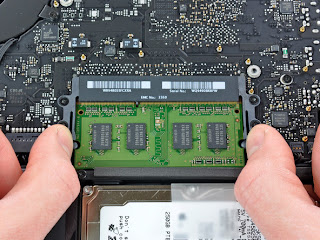
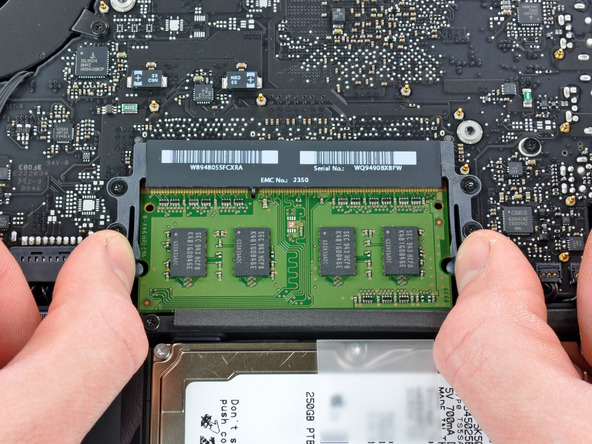
  3. Press the hook to the side out on each side of the RAM slot, note the picture below

  4. Then you can change the another RAM/memory module
May be useful :D

Saturday, April 16, 2011

Hard Drive Repair - Recover Hard Drive Data


Almost everyone relies on their computers and hard drives to store their important pictures. Some even keep their important memories like the first picture of their daughter running on their hard drives. Danger save the pictures on your drive was that it was not safe at all. In a brief moment, the worst could happen and may accidentally deleted files. And if it does not apply and you feel that free all is lost, the data recovery is still going to give a glimmer of hope.

It's good to know that unlicensed even though a great misfortune applies to your computer, big sebahagian the data or files still may be found at your drive. Soalan for many people is how to recover deleted files-these files in your hard drive? Basically, you have two options to choose from. The first is always the most safe way and that is to let the experts handle the job. Bring your hard drive to a data recovery center and let them do the hard work. Data recovery is a very difficult task that will require expert knowledge in data recovery. It offers less risk in recovering and restoring your important fail-fail.

The second option is to do its own recovery. For someone who is good at computers and can follow instructions, this is a cheaper option kerana they do not have to pay for the services of experts. Unfortunately not everyone is good at the computer can perform difficult tasks to restore files abolished. Danger perform data recovery by yourself is lost eternally fail. At the end instead of helping yourself to get the files you want, you end up doing more kerosakan and eternally lost files. This is an important consideration to remember when doing recovery.

After thinking through and you decide that free you are able to recover files from your hard drive dipadam, so step is to find a program that will help you perform this complex task. There are programs and freeware that can be downloaded via the Internet. Several free programs are more complex but comes with a cost. The advantage of using a program that will menjimatkan kerana wang you do not need to hire or pay a data recovery expert to recover files deleted from your hard drive. For many, this is a smart idea since the program can do almost the same perkhidmatan not experts.

But again, it should be stressed that free recover deleted files from your hard drive is a commercial complex and risky. Someone who is not good or proficient with the computer should be trying to stay away from studying or circumvent the huge task of data recovery. Also, not all programs to do it yourself data recovery may be used for all kinds of lost data or files deleted. Examples of when the drive is the physical rosak. But for simple things recover deleted files from hard drives are very good, software that is most capable of working. You only need to be very careful when doing the recovery yourself to circumvent more merosakkan cakera you that will make it more difficult to recover files that dipadam or may even turn into the worst loss you fail eternally.

Article Source: http://EzineArticles.com/6168535

HTML5 Canvas element


One of the existing development on the HTML 5 is the Canvas element. HTML5 Canvas element is a miracle that allows web designers to embed interactive visual images via the HTML language. With a variety of credit attributes, providing the output is quite similar to the original web software used in the preparation of dynamic images and animation.

How does it work?

A wide assortment of methods and properties bring life into a web page using the canvas element. To draw a rectangle, gradient fill and transformation to scale and rotate, JavaScript is used. Bezier curves and arcs can also be integrated to obtain the desired interface.

Such as image tags, canvas elements using attributes such as width and height. Id is required to identify with JavaScript or other scripting language. By defining the canvas tag in this way, the layout is rendered invisible on web pages. The elements of style sheets such as borders, background colors or margins help reveal the true picture of the canvas on the screen. Standard color is always black. Tags using a color attribute to use RGB or hexadecimal value.

To create fillRect rectangular (x, y, w, h) the syntax used to create a rectangle on the screen when strokeRect (x, y, w, h) defines the use of border or stroke. fillStyle () and strokeStyle () sets form a pattern, specific colors and gradients. x and y coordinates are assigned values. The size of the value indicated by w and h. Some roads with a few strokes can be made on line beginPath () and closePath () at the beginning and end of the road. As the gradient rectangle, diagonal or other also has four arguments in which the two first shows the starting point and the last two end points of the gradient. However, the radial gradient using the six arguments where the three arguments is to circle from the starting point and the remaining three to circle for the end point. To make a straight line, moveTo () and lineTo () method is used. For character input in canvas tag, there are three attributes that can be used; fonts, textAlign, textBaseline To return the object to draw, getContext () method is used where the 2d context of the more popular methods.

Canvas Support!

Canvas elements supported by the latest versions of browsers and mobile devices such as Internet Explorer, Firefox, Safari, Chrome, Opera, iPhone and Android. In case the browser is not working with canvas and then fill fallback element is inserted in an image tag between the opening and closing tags canvas. In other words, the content is a fallback image file that will be displayed if the canvas element is not supported in the browser. JavaScript uses document.addEventListener (DOMContentLoaded) syntax to load the page.

HTML5 Canvas element most prominently used for animations and moving objects. It is somewhat inevitable to display static images. Needs dynamic output every hour and every day throughout the year targeted by the canvas tag. canvas tag is often used by websites that run on JavaScript. Compared with Adobe Flash, it loads fast and has become the latest craze on the world wide web.

Source: www.enzinearticles.com

Monday, March 28, 2011

Some Secret Key for Samsung

Software version: *#9999#
IMEI number: *#06#
Serial number: *#0001#
Battery status- Memory capacity : *#9998*246#
Debug screen: *#9998*324# – *#8999*324#
LCD kontrast: *#9998*523#
Vibration test: *#9998*842# – *#8999*842#
Alarm beeper – Ringtone test : *#9998*289# – *#8999*289#
Smiley: *#9125#
Software version: *#0837#
Display contrast: *#0523# – *#8999*523#
Battery info: *#0228# or *#8999*228#
Display storage capacity: *#8999*636#
Display SIM card information: *#8999*778#
Show date and alarm clock: *#8999*782#
The display during warning: *#8999*786#
Samsung hardware version: *#8999*837#
Show network information: *#8999*638#
Display received channel number and received intensity: *#8999*9266#
*#1111# S/W Version
*#1234# Firmware Version
*#2222# H/W Version
*#8999*8376263# All Versions Together
*#8999*8378# Test Menu
*#4777*8665# GPSR Tool
*#8999*523# LCD Brightness
*#8999*377# Error LOG Menu
*#8999*327# EEP Menu
*#8999*667# Debug Mode
*#92782# PhoneModel (Wap)
#*5737425# JAVA Mode
*#2255# Call List
*#232337# Bluetooth MAC Adress
*#5282837# Java Version
Type in *#0000# on a Samsung A300 to reset the language
Master reset(unlock) #*7337# (for the new samsungs E700 x600 but not E710)
Samsung E700 type *#2255# to show secret call log (not tested)
Samsung A300, A800 phone unlock enter this *2767*637#
Samsung V200, S100, S300 phone unlock : *2767*782257378#
On the main screen type
• #*4773# Incremental Redundancy
#*7785# Reset wakeup & RTK timer cariables/variables
#*7200# Tone Generator Mute
#*3888# BLUETOOTH Test mode
#*7828# Task screen
#*#8377466# S/W Version & H/W Version
#*2562# Restarts Phone
#*2565# No Blocking? General Defense.
#*3353# General Defense, Code Erased.
#*3837# Phone Hangs on White screen.
#*3849# Restarts Phone
#*7337# Restarts Phone (Resets Wap Settings)
#*2886# AutoAnswer ON/OFF
#*7288# GPRS Detached/Attached
#*7287# GPRS Attached
#*7666# White Screen
#*7693# Sleep Deactivate/Activate
#*2286# Databattery
#*2527# GPRS switching set to (Class 4, 8, 9, 10)
#*2679# Copycat feature Activa/Deactivate
#*3940# External looptest 9600 bps
#*4263# Handsfree mode Activate/Deactivate
#*2558# Time ON
#*3941# External looptest 115200 bps
#*5176# L1 Sleep
#*7462# SIM Phase
#*7983# Voltage/Freq
#*7986# Voltage
#*8466# Old Time
#*2255# Call Failed
#*5376# DELETE ALL SMS!!!!
#*6837# Official Software Version: (0003000016000702)
#*2337# Permanent Registration Beep
#*2474# Charging Duration
#*2834# Audio Path (Handsfree)
#*3270# DCS Support Activate/Deactivate
#*3282# Data Activate/Deactivate
#*3476# EGSM Activate/Deactivate
#*3676# FORMAT FLASH VOLUME!!!
#*4760# GSM Activate/Deactivate
#*4864# White Screen
#*7326# Accessory
#*7683# Sleep variable
#*3797# Blinks 3D030300 in RED
#*7372# Resetting the time to DPB variables
#*3273# EGPRS multislot (Class 4, 8, 9, 10)
#*7722# RLC bitmap compression Activate/Deactivate
#*2351# Blinks 1347E201 in RED
#*2775# Switch to 2 inner speaker
#*7878# FirstStartup (0=NO, 1=YES)
#*3838# Blinks 3D030300 in RED
#*2077# GPRS Switch
#*2027# GPRS Switch
#*0227# GPRS Switch
#*0277# GPRS Switch
#*22671# AMR REC START
#*22672# Stop AMR REC (File name: /a/multimedia/sounds/voice list/ENGMODE.amr)
#*22673# Pause REC
#*22674# Resume REC
#*22675# AMR Playback
#*22676# AMR Stop Play
#*22677# Pause Play
#*22678# Resume Play
#*77261# PCM Rec Req
#*77262# Stop PCM Rec
#*77263# PCM Playback
#*77264# PCM Stop Play
#*22679# AMR Get Time
*#8999*364# Watchdog ON/OFF
*#8999*427# WATCHDOG signal route setup
*2767*3855# = Full Reset (Caution every stored data will be deleted.)
*2767*2878# = Custom Reset
*2767*927# = Wap Reset
*2767*226372# = Camera Reset (deletes photos)
*2767*688# Reset Mobile TV
#7263867# = RAM Dump (On or Off)
On the main screen type
• *2767*49927# = Germany WAP Settings
*2767*44927# = UK WAP Settings
*2767*31927# = Netherlands WAP Settings
*2767*420927# = Czech WAP Settings
*2767*43927# = Austria WAP Settings
*2767*39927# = Italy WAP Settings
*2767*33927# = France WAP Settings
*2767*351927# = Portugal WAP Settings
*2767*34927# = Spain WAP Settings
*2767*46927# = Sweden WAP Settings
*2767*380927# = Ukraine WAP Settings
*2767*7927# = Russia WAP Settings
*2767*30927# = GREECE WAP Settings
*2767*73738927# = WAP Settings Reset
*2767*49667# = Germany MMS Settings
*2767*44667# = UK MMS Settings
*2767*31667# = Netherlands MMS Settings
*2767*420667# = Czech MMS Settings
*2767*43667# = Austria MMS Settings
*2767*39667# = Italy MMS Settings
*2767*33667# = France MMS Settings
*2767*351667# = Portugal MMS Settings
*2767*34667# = Spain MMS Settings
*2767*46667# = Sweden MMS Settings
*2767*380667# = Ukraine MMS Settings
*2767*7667#. = Russia MMS Settings
*2767*30667# = GREECE MMS Settings
• *#7465625# = Check the phone lock status
*7465625*638*Code# = Enables Network lock
#7465625*638*Code# = Disables Network lock
*7465625*782*Code# = Enables Subset lock
#7465625*782*Code# = Disables Subset lock
*7465625*77*Code# = Enables SP lock
#7465625*77*Code# = Disables SP lock
*7465625*27*Code# = Enables CP lock
#7465625*27*Code# = Disables CP lock
*7465625*746*Code# = Enables SIM lock
#7465625*746*Code# = Disables SIM lock
*7465625*228# = Activa lock ON
#7465625*228# = Activa lock OFF
*7465625*28638# = Auto Network lock ON
#7465625*28638# = Auto Network lock OFF
*7465625*28782# = Auto subset lock ON
#7465625*28782# = Auto subset lock OFF
*7465625*2877# = Auto SP lock ON
#7465625*2877# = Auto SP lock OFF
*7465625*2827# = Auto CP lock ON
#7465625*2827# = Auto CP lock OFF
*7465625*28746# = Auto SIM lock ON
#7465625*28746# = Auto SIM lock OFF
Type *#9998*627837793# Go to the ‘my parameters’ and there you will find new menu where you can unlock phone.(not tested-for samsung C100)
To unlock a Samsung turn the phone off take the sim card and type the following code *#pw+15853649247w# .
Java status code: #*53696# (Samsung X600) 
If you want to unlock your phone put a sim from another company then type *#9998*3323# it will reset your phone. Push exit and then push 7, it will reset again. Put your other sim in and it will say sim lock, type in 00000000 then it should be unlocked. Type in *0141# then the green call batton and it’s unlocked to all networks. This code may not work on the older phones and some of the newer phones. 
If it doesn’t work you will have to reset your phone without a sim in it by typing *#2767*2878# or *#9998*3855# (not tested)

Thursday, October 21, 2010

Megapixel


When we buy a digital camera, we have always offered a camera with a variety of species, by stating how many megapixels they own.This is a common trait that is often mentioned digital camera manufacturers. From 3 to 12 megapixels or more, it seems that with each generation of digital cameras, there is a higher resolution image.
But what we need that megapixel? A mega pixel is represented by 1000000 (one million pixels).
So, if the maximum resolution digital camera provides an image 3000 pixels wide and 2300 pixels high, this camera has a resolution of 3000 x 2300 = 6900000 / 1000000 = 6.9 megapixels.
Speaking about the megapixels, the question arises: whether the high-megapixel camera with necessary? because high-megapixel cameras with more expensive.
If you intend to use the images on the Internet you will find that the maximum resolution of 1600 x 1200 will be sufficient. That means buy a 1.92 megapixel camera!
If you want to print pictures, you should consider the requirements of pixels per inch. 300 pixels per inch is standard in the printing of each image.It simply means that all you need to do to find the maximum width of printed images is to divide the width in pixels by 300.
3000 pixels / 300 = 10 inches maximum.
so it is recommended in selecting a digital camera tailored to the needs. it helps you prioritize the quality of optical zoom.

Thursday, October 14, 2010

Book review Asuro Robot of Raffaello Bonghi

Asuro is a small programmabile robot in C with a microcontroller ATMEL ATMEGA8L. Been born like didactic robot, this is optimal for the first experimentations in the world of the robotics. The robot is reached in a box it of dimensions 20 x 17 x 7 cm Inside of the box it they were present: CD with handbook Card of the Asuro robot Card of the emitter Infrared Electronic and mechanical parts Material miscellaneous and a little ball from ping-pong. The robot appears without a doubt for a public young person, even if during the assembly a short guide is need of a sure preparation for being able to correctly knit the robot (inside of the handbook is present who explains the corrected use of the saldatore). After to have mounted the robot and the card for the seriale programming the robot turns out already operating thanks to a program already loaded inside with the PIC that verification the motors and the sensors of the robot. But now we begin to analyze to the card of the robot and all the fundamental characteristics, leaving from the microcontroller who it adopts.

Thursday, August 5, 2010

Java

Java is a highly portable computer programming language. "Portable" is a term used to describe programs that can be run in many different computing environments and on many different "platforms" (MS Windows, Apple's Mac OS, Solaris, and Linux are all examples of "platforms")

It is Java's portability that makes it such an intriguing technology. To give you an example of how this portability relates to real world features and benefits, let's say you have a program that is written in Java such as a web browser. Normally, with a web browser application, the user is bound to the settings for the browser application and the configuration of the machine that they are using it on. So, at the office, the machine on Joe User's desktop has one set of bookmarks, plug ins, security setting, etc. Joe's machine at home will most likely have a different set of bookmarks, plug ins and settings. Now, let's say Joe want to have a more consistent experience with the computers that he uses everyday. Joe could install a Java-based browser on removable writable media (such as a floppy diskette, pen drive, zip disk or CDRW) and carry his browser with him (with all the settings, bookmarks and plug ins in tow as well!)

Java is not only portable, but it is also widely known, and does not need to be interpreted (like PHP, Java script and some other and other languages). Java also does not have to be compiled on the machine it will be run on. Java can be compiled once and run in its binary form on many systems. Although there are other languages out there that are extremely portable, there are few that could stand up to Java's "compile once, run everywhere" functionality. Java is truly a useful and feature rich programming language and is used to program many software programs on the market today.
Source: Free Articles

Monday, July 26, 2010

Wallpaper Slideshow - UBUNTU

We can create a cool Wallpaper slideshow like MAC OS on Ubuntu. The application used is Wallpaper Try.
Now we install wallpaper tray, just type on your console:
$ Sudo apt-get install wallpaper-tray
After the installation process is complete, add application on your toolbar by right clicking on the toolbar, select Add to Panel, actived Wallpaper Tray.
To configure the slideshow, just right click the icon in the toolbar, select Preferences. At the facility where you can set the background folder and other settings, like the time change and how the background show. Then enjoy your Wallpaper Slideshow.

Sunday, June 27, 2010

Install JDK and JRE for Ubuntu

How can I install Sun Java Development Kit (JDK) and Java Runtime Environment (JRE) on Ubuntu Linux?
To install the JDK, JRE in ubuntu, and we can use an online repository.By using the following command in the terminal:

$ sudo apt-get install sun-java6-bin sun-java6-jre sun-java6-jdk

That's the simple way that I use.good luck...

Friday, April 9, 2010

Performance And Aesthetic Feeling Sony Z19N Notebook Evaluation

With the use of fuzzy laptop and notebook computers are classified according to use is really more and more difficult. Commercial, domestic notebook classification of the product users nowadays seems a bit outdated. Notebook computer market nowadays, however, there are still persistent in the commercial notebook brands, including Fujitsu, Lenovo, Toshiba, DELL, HP, Sony. Sony is one of the performance of one of the most active of the brand is able to combine industrial design with a brand of notebook.
 SONY Z19N
 SONY Z19N

Sony introduced new notebook computers often before, can attract attention of many users. Why? Sony is an advocate of product innovation company, we used to call it technological aesthetic. Following the current commercial products sold after the SZ series, Sony announced a new generation of Centrino 2 platform, Z-series business notebooks. But according to Sony's past practice, business notebooks will only keep a family, believe the Z series will be replaced in the near future SZ series.

Advantages:
1, excellent work
2, top hardware
3, dual graphics switch
4 Molded Products C surface
5, the use excellent comfort
6, random software-rich If a laptop is not a high-quality notebook battery, can not guarantee notebook stable long hours of work, use the laptop must have an external laptop power supply, then the laptop loses its own significance. But the batteries are consumable, generally able to stabilize the work time in a year or so, then there may be "sudden die-off." If you are planning to buy laptops, then the need for laptop battery to do a physical exam in order to discover the battery problems.

source: www.articlesbase.com

Monday, January 11, 2010

[ HOW TO UBUNTU ] Connect LCD Projector

Easy way to connect LCD Projector:
1. setting your display resolution to 800x600 or resolution that can be supported by your projector.
2. use this
magic word
on terminal:

xrandr --auto

Good Luck

Wednesday, January 6, 2010

Remote PC via Bluetooth (for presentation)

This is a trick to remote the PC or Notebook via bluetooth, especially for presentation purposes. but it tricks also you can use to remote for other applications that you wish.
To do this trick you need a bluetooth active in your PC or notebook and a mobile phone that has bluetooth and support for java applications (JAVA midp 2). In this tutorial I use a Compaq Presario V3000 notebook and Nokia 6300, but you can use other peripheral comparable.
First, install the Nokia Wireless Presenter application on your PC, you can download at http://nds1.nokia.com/files/support/apac/phones/software/Wireless-Presenter-EN_UK-Setup.exe .
Then install the java aplication on your mobile phone: presenter.jar (eg for nokia 6300) you can download at http://nds2.nokia.com/files/support/apac/phones/software/Nokia_6233_Wireless_presenter.zip .
Then equate "Bluetooth Serial Port (incoming)" is in the application with bluetooth port on your PC.


You can also add or modify application that you are going to remote.

Thursday, July 16, 2009

How To Speed Up Your PC

you have a problem with the speed of your PC? sometimes very frustrating to work with a slow PC. So we need to improve the performance of our PC.A registry cleaner is the answer! Registry cleaners are one of the fastest ways to get more speed on your PC, whether it is three years old or six months old, a registry scan and clean can produce some amazing results. You should always look at the reviews of the registry cleaner before you buy it. You want to look for a registry cleaner that has both pros and cons, but overall has lived up to its reputation. Do not purchase a registry cleaner that has glowing reviews as it is most likely a scam.

Once you have purchased the registry cleaner, install it on your computer. You should then restart, and then make a backup of your registry. In order to make a backup of your registry, click on start, run, type in "regedit" then hit enter. Now go to file, select export and save the file to external media such as a USB stick. Now you can run the registry scan. This process may take a few moments, so feel free to stand up, walk around, and do whatever you wish while the scan is running. After the scan has finished, check the list of infections and problems for anything that looks legitimate. Sometimes, registry cleaners can report false positives, files that you actually will need in order to keep your computer running. After you have removed the false positives, you can allow the registry cleaning program to take care of the rest of the problems and infections. It will now prompt, or automatically restart your computer. This will allow the registry to clear those errors for good, and restart in a clean condition. You should notice an extreme improvement in speed, due to the reduced size of the registry.

How to speed up my PC? Maybe your computer is not quite as fast as you have wished. There are a few things that you can do after having already done a registry cleanup. Try to defragment your computer's hard drive. This groups your computers files together, and will save time when you are switching programs, or files. Disk cleanup is another useful tool. It can help you increase the amount of disk space on your computer by deleting files in the recycle bin, temporary internet files and other unnecessary files.

How to speed up my PC? If all of these different tricks have not worked, and you have run an anti-virus and spyware program to remove infections, it may be time to take a look at your systems processes. Many of these are not necessary to operate your computer, and can be disabled. There are several guides available that tell you which ones are necessary, and which are not. Make sure you are careful, as disabling the wrong process can cause serious damage to your computer.

When you are trying to speed up your PC, you will need a registry cleaner that has been proven to remove all of the infections and problems on your computer. Do not use false knockoffs, or free versions as they will cause further damage to your computer!

Ready to learn How to Speed Up My PC? Do you need a solution TODAY? Learn exactly why your windows computer is running slow and learn how you can fix it permanently for FREE. Visit http://www.FixMyComputerQuick.com to fix your computer problems TODAY!

Article Source: http://EzineArticles.com/?expert=Jacob_Turner

Sunday, July 12, 2009

Cisco Acknowledged Training Centers For 640-802 Test

Who need Sisco Certificate? It's a usefull certificate for the network technician.
Cisco Certified Network Associate 640-802 test is to determine candidates' both theoretical knowledge and practical skills in small and medium sized enterprise branch network. While it is possible to learn it yourself, the theory part, you will certainly need the guidance of experts when it comes to developing your practical skills in networks.

There are several websites that offer practical training for 640-802 test. While Cisco press itself has released a number of books on various titles for self-study, experts recommend that joining online training centers would be very beneficial for both 640-802 test conducted by Cisco as well as when on job. A list of things to practice provided in this article will be of great help to you as you plan to attempt your 640-802 test.

For instance, you should get yourself trained to create a network of two computers using cross-over cables; to be adept in creating bus network, mesh network, and star network; to configure hub, switch, router, and DHCP on the network; to successfully experiment with VoIP; to create intranet; to configure modem, router, ISDN, and internet connections; to use of commands like ping, pathping, and TRACERT; to verify configuration and connectivity of network interface card; to familiarize with various types of media, cables, connectors and the like.

A few other areas to acquaint yourself before attempting the test include configuring of wireless LAN; troubleshooting VLANs; both configuring and troubleshooting of Cisco switches, VTP, VLSM IP addresses, OSPF, EIGRP, and RIPv2; using CLI with various commands; debugging commands; configure and apply access control on various filtering needs; using CLI to configure NAT; experimenting with Frame Relay on Cisco routers; and verifying PPP connections among Cisco routers. As all of the above mentioned can not be practiced without help or proper guidance, it is wise to abide by the counsel of the experts in getting your Cisco Certified Network Associate certification for 640-802.

Now, It's time to reveal my success with CCNA 640-802 exam by using 640-802 exam Questions and Answers. I am very proud of being CCNA Certified now!

Article Source: http://EzineArticles.com/?expert=Francis_Murphy

3 Reasons to Own a Computer

Computers make our duty easy. What did we ever do without computers? I am not sure I even remember the time when they didn't exist. Computers rule our world, and most everything we do. Kids as early as the age of three know how to use them and many of us find them indispensable in our daily lives. Yet there are many people that have not yet delved into the technology of the present and future. Some find computers intimidating and unnecessary. Hard to imagine, but true.

The convenience factor cannot be beat and as far as information goes, nothing is faster or more useful than typing a phrase into Google or Yahoo search and getting back thousands of relevant pages full on information. Not to mention the instant communication benefits of email versus regular mail, which is now appropriately termed snail mail. So, in case your still wondering what the benefits of computers are, here is a list which hopefully will prompt you to join us in our computer happy world.

3 Reasons to Own a Computer

1. The first benefit for owning a computer is finding information on the Internet. The Internet was first created during the 1960s for military reasons. However, the Internet started to expand and became widely available for everyone in the 1990s. When users connect to the Internet, they are able to find a lot of information without driving to the library.

The library is a wonderful place for children to learn how to read. However, there are obsolete books and people are required to carry a library card. Also, if people lose their book, then they will be required to pay a fine to the library. Researching on the Internet provides current information every day and people don't have to borrow or pay fines to the library.

2. The second benefit for owning a computer is sending and receiving electronic mail. E-mail services are being paid by banner and sponsored advertising. Therefore, people will be able to send and receive messages for free. Also, e-mail provides fast and speedy service without waiting for the postman.

While the postman is great for receiving large packages, the price for a stamp increases every year. Furthermore, depending on the location, people will have to wait for a reply. By using e-mail, people will be able to receive replies within minutes or the next day at the latest.

3. The third benefit for owning a computer is making new friends. The Internet allows people to use social networking sites to reunite or make new friends. Without using a computer, people won't be able to know where their friends are located. Therefore, people have to rely on the big and bulky telephone book to find information. Also, international friendships are impossible due to currency rates and higher postal fees. As a result, people are unable to learn about different cultures and trends in an international area.

Learn more about computers with buying guides, reviews, Top 3 Desktops, features guides, fixes and how-to's and shop for all models and brands, of desktop computers, including, Dell, HP, Apple and more at cheap prices at: Dell Computers.

Article Source: http://EzineArticles.com/?expert=JR_Lang

Thursday, May 21, 2009

Silhouette Photography

Silhouette photography is a wonderful way to convey drama, mystery, emotion and mood in a picture. A silhouette is defined as a view of an object or a scene consisting of the outline and a featureless interior, with the silhouetted object usually being black. Pictures like these often don’t convey a clear story, and leave part of the image up to the imagination of the viewer.

The key to taking a silhouette picture would be to: choose a strong subject with a defined and recognizable shape; turn off your flash to have as little light on the front of your subject as possible; get the light right by having more light shining from the background than the foreground; frame your image so that the brightest light source is behind your subject; and make sure the silhouette shapes are distinct and uncluttered by making subjects recognizable and keeping multiple subjects separate.

Thursday, March 19, 2009

10 Principles For Readable Web Typography

Readability is one of the more important aspects of Web design usability. Readable text affects how users process the information in the content. Poor readability scares readers away from the content. On the other hand, done correctly, readability allows users to efficiently read and take in the information in the text. You want users to be able to read your content and absorb it easily.

In this post, we’ll explain some Web typography terms and how they play into readability; we’ll present numerous tips to help improve the readability of your content; and we’ll showcase very readable websites, layouts and articles.

The Terms, And What Each Means For Readability

There are many factors that play into the readability of text. There are also a number of terms, all very important. Here are a few of the more common Web typography terms and an explanation of how each term affects readability.

Hierarchy
Every typographic layout needs the essential element of hierarchy. Hierarchy defines how to read through content. It shows the user were to start reading and where to read through. It differentiates headers from body text. Although colors of text boxes can be used to contrast headers and body text, hierarchy refers to the difference in size between these elements. Hierarchy plays a huge part in how scannable a layout is. It is an important technique that needs to be mastered to achieve readable Web typography.

Contrast
Contrast is the core factor in whether or not text is easy to read. Good contrasts will make text easy on the eyes, easy to scan quickly, and overall more readable. On the other hand, poor contrast will force the user to squint and make reading the body text almost painful, not to mention a lot slower.

As shown in the following illustration, black on white is very readable. Black on white is obviously the standard contrast colors, and to achieve readable content it is good to stay in the range of black-on-white contrast.

This one, however, pink on blue, is nearly impossible to read. This example my be a little extreme, but it shows how such an awful contrast can have a major impact on the text. You probably won’t see websites using such poor contrast, but it still shows why you need to be very smart about it.

Line Height
Line height is a very common term meaning the space between individual lines of text. Line height is another factor in the readability of body text and even headers. Sufficient line height is especially important in Web design because it makes the text ultimately more scannable. Line height that is too short will cause users to squint while reading. If it is too large, the text will seem like separate bodies instead of grouped together as one.

Letter Spacing
Like line height, letter spacing affects readability in Web typography. Letter spacing is, as the name suggests, the space between each letter in words. In print layout, negative letter spacing is a common technique to add a more fun feel to the layout, but it should never be used in body text. In any text, letter spacing is an obvious factor in legibility.

Line Length
Line length is often overlooked in Web typography but should not be. Line length is, of course, the number of words per line. A good line length is one that allows the reader’s eyes to flow from the end of one line to the beginning of the next very easily and naturally.

The Keys to Readable Typography

Achieving readability is relatively easy; all it takes is to follow a few key practices. A readable Web page can go a long way with your users, and readability has a huge impact on their experience. Designing for the Web is all about making the user’s experience as pleasant as possible. Here are 9 tips that will help you work towards readability.

1. User-Friendly Headers
Headers are a key element in typography, Web and print alike. As mentioned, they are part of the text hierarchy and a major factor in scannable content.

First off, header size is just as important as the size of the body text. Going too big with the header with a large amount of content can throw the user off balance when reading and cause them to lose their spot. It will ultimately ruin the flow of the content and be a distraction. Headers that are too small will ruin the hierarchy of the article, too. If the header is too small, it will not draw the user’s attention as it should.

Next, it is important to provide ample space between the header and body text.

2. Scannable Text
I have already mentioned “scannable” text many times, and you have surely heard it elsewhere. Scannable text goes hand in hand with readable text. Making copy scannable consists of good use of headers, hierarchy and focus points to guide the user through the content.

So, what makes copy scannable? Well, there are many factors, most of which have already been mentioned. Header size and position, body text size, text line height, text contrast and the way focus points are differentiated all impact how scannable copy is.

Focus points are certain elements or objects within the layout that attract, or are supposed to attract, the user’s attention. This could be a header, a graphical element, a button, etc.

3. White Space
In content-heavy layouts, spacing contributes to the readability of content. White space helps to offset large amounts of text and helps the user’s eyes flow through the text. It also provides separation between elements in the layout, including graphics and text.

In the example below, white space and only white space is used to separate text elements. The layout is very clean and efficient. The user’s eyes flow from text element to text element with ease, because of the large amounts of white space.

4. Consistency
Consistency is often regarded as an important technique for usability, but it also applies to readability. Consistency in the hierarchy is important to a user-friendly layout. This means that all headers of the same importance in the hierarchy should be the same size, color and font. For example, all headers in an article should look identical. Why? This consistency provides users with a familiar focus point when they are scanning, and it helps to organize the content.

5. Density of Text
Density of text refers to the amount of words you place in one area. Density of content has a major impact on your content’s readability. Density is affected by spacing options such as line height, letter spacing and text size. If you find a balance between all of these so that the content is neither too compact nor too widely spaced, you will have perfect density that is both readable and scannable.

6. Emphasis of Important Elements
Another key factor is emphasis of certain elements within the body content. This includes highlighting links, bolding important text and showing quotes. As mentioned, focus points are essential in Web typography. By emphasizing these objects, you provide focus points for the user. These points and objects help break up monotonous text.

Scannable text is extremely important. By providing these focus points,, you make the body text extremely scannable. Bolding key lines of text immediately attracts the user’s eye and is therefore a very important element in presenting important information.

Pictured below is an article from UXBooth. This article uses bolding and italics to point out important information in the article. This is a very readable article and very easy article to scan for information.

7. Organization of Information
Believe it or not, the way you organize information in an article can strengthen readability. Users are guided with ease through content that is properly organized because information is easier to find. This veers into issues beyond the scope of this article but is still very important.

8. Clean Graphical Implementation
Every text body needs some sort of visual support, be it an image, icon, graph or illustration. Placing the graphic in the article can be challenging. Sufficient space is needed between the graphic and text.

If the graphical element is an image, then a clean border is a good idea for providing a clean separation from the text. Borders can help guide the user’s eyes and are good for adding style to content. It is important, however, to keep borders in content simple. They should have a subtle color palette and shouldn’t be too large.

In the case of graphical elements such as icons and illustrations, space is the only separator that should be used. The content should move cleanly around the graphic without disrupting the text.

9. Use of Separators
Separators are a simple and easy way to divide text into sections in a clean and organized manner. They can be used to divide hierarchy elements, such as headers and body text. They can also be used to divide content into sections.

The simplest form of divider is a single line. These are most often used to divide hierarchy elements and are very useful for making subtle divisions that still play a big role in readability.

Another common way to divide content is to use boxes. Text boxes are excellent for separating unrelated content on a single page. They help move the user’s eyes through a complex layout. Below is an example of this on Pixelmator’s website. It uses boxes to separate content in a clean way. Notice how the boxes are defined by their background instead of a border.

10. Good Margins
You hear people say that you should use white space, but why? White space actually helps draw the user’s eye to the text. The blank area (white space) forces the eye to focus on the text. So white space will influence the flow and readability of content. Margins are one of the best white space elements and support text elements well. Margins on either side will force the user’s eye to focus inward on the core content of the article.

Margins also support the article in another way. They help separate content from the rest of the design and layout. Text shouldn’t bleed into other layout elements, especially if it is a long article. Margins help define the article and its separation.

In the grid-based layout below, margins and only margins are used to set apart bodies of text. The result is a clean, clear and concise page.

article source: http://www.smashingmagazine.com/2009/03/18/10-principles-for-readable-web-typography/

Saturday, February 28, 2009

Writing an Interface Style Guide

Take a look at any CSS-based website design gallery, and you’ll see it’s obvious that beautiful interfaces are being designed and developed in amazing quantities. I frequently look to these sites for inspiration and, beyond a nice design and beautiful code, there’s usually something common about these sites: they’re new.

Unfortunately, it’s also common that beautiful interfaces don’t stay beautiful. An interface’s design disintegration can be frustrating to deal with, especially for the designer and developer of that interface; it can be particularly frustrating for the designer and developer who can no longer access the site to fix the issues.

If you have ever designed a beautiful interface only to find it ugly five months later because gaudy graphics, unpleasant colors, and distasteful fonts appeared over time, then you understand how maddening design disintegration can be. Similarly, if you have ever developed a clean, web standard, and accessible interface but later found the site littered with invalid, inaccessible, and presentational markup, then you understand this frustration as well.

Documentation can help avoid these issues—it provides guidance on how to maintain and update the interface, and keep it beautiful at the same time.

Design and brand standards

Interface design standards enable brand stewardship. Commonly documented in a design “style guide,” these standards inform clients and content editors of branding guidelines for typography, whitespace, color, etc. The design style guide provides a reference in which developers can describe the way the interface is intended to look, and helps designers to be consistent as the interface is updated so that, in turn, the interface continues to feel consistent.

Some design style guides are simple and straightforward, including only basic typography and color styles; others are informative and somewhat complicated, and go into great detail in defining all aspects of brand guidelines. Like the interface itself, a great design style guide should be straightforward, intuitive, and informative. It should provide detailed information, yet be clear and concise. The following are important elements and relevant details to include.

Layout and composition

Define all the layout variations that are used for the interface, and when and how they are used. Show wireframes to illustrate these variations (such as different column configurations and where they are used).

Typography

Explain the guidelines for acceptable use of typography. Use illustrations to show examples for the main text, the headline styles and their hierarchy, list styles, etc. It is also a good idea to define the typography standards in promotional graphics, as well as list the alternate typefaces that can be used for hypertext (in the event that the user does not have the font you have declared).

Color palette

Provide a color palette to illustrate the standard colors that must be used throughout the interface. This reference should include exact color codes (you can list hex color values or RGB values). It is good to show where these colors are used. For example, you can include a screenshot that shows the color used for links.

Images

Define the standard image sizes that may be used throughout the interface. This should include any graphic banners (such as promotional banner advertisements) as well as images that are used within content. Show how they may be styled and aligned, and how captions should appear (if used). You can also include what type of imagery that may be used (such as illustration or photography, as well as allowable styles or “mood”). Finally, if you use any icons in the site, set standards for them, such as how they look, where they are used, how they are styled, etc.

Brand guidelines

Beyond typography and color, brand guidelines can include other standard design elements. These standards might define the amount of space allowed around the logo, how the logo appears depending on the background it sits on, or how the organization’s name should always appear in text.

Some style guides include supplementary information beyond the look and feel (for example, you can include standards for copywriting, advertising, and other elements that influence the interface and user experience). When defining design standards, you can even include the related markup and CSS needed to create the visual appearance expected. However, it might be better to create a separate section or document for these front-end development standards.

Front-end development standards

If there is more than one developer on the interface, it is extremely important that everyone is aware of the development standards. It is likely that each developer has his or her own way of doing things. Getting everyone synced on (X)HTML, CSS, JavaScript, and other aspects of front-end development can help avoid any confusing issues down the road. While a design style guide outlines design and brand standards, a development style guide is important to keep development efficient. This can be a separate document, or included with the design style guide.

(X)HTML, CSS, and JavaScript

Delineate how (X)HTML, CSS, and JavaScript should be used when developing the interface. Address the standards that developers should follow, which DOCTYPE to use, as well as class and ID attribute naming conventions. Include the code used to create certain layouts, forms, widgets, etc. Outline formatting and commenting standards, and define how the framework is set up (if a framework exists). (X)HTML, CSS, and JavaScript standards can be discussed together, as they all play together, but it can be helpful to go in-depth for each one, in their own sections.

Accessibility and usability

Identify the accessibility guidelines that must be followed, and include any usability mandates. Document any localization and internationalization standards that exist.

Files and directories

Define how the directory structure is set up for files (images, style sheets, JavaScript files, etc.), and where these files go (according to their types or purpose). Explain file naming conventions and how they are used.

Quality assurance testing

Walk through the steps that should be taken for quality assurance: validation, link checking, accessibility testing, proofreading, etc. Include a graded support chart for browsers and devices.

When discussing standards in your development style guide, it should be clear that the standards outlined are not only industry-wide standards—they are also organizational standards that all developers should follow. Keeping development consistent goes hand in hand with keeping the design consistent, and should help make work more efficient and improve maintainability.

Keep style guides current and useful

Interface style guides are extremely useful to define best practices for design and development. However, keeping that information updated and functional is imperative. A glossary, an index, references, acknowledgments, etc., are among some of the supplementary details you can add to make the style guide as helpful as possible.

You’ll want to have this style guide easily accessible for designers and developers. While a printed version is great to have on hand, an online version can be easier to access, maintain, and keep current. If you do not wish to keep track of both a printed and online version, you can opt for print style sheets on the online version, so you only have to update the information one time.

Finally, provide information on how someone can get help, in case the style guide is unable to provide certain answers. List contact information for the person or team(s) that manage this documentation.

With proper documentation for clients and content editors to follow, you have a better chance at seeing your interface stay beautiful. Future designers and developers who work on the interface will have an easier time adapting, thus making their lives easier and potentially saving time and money.

Article Source: http://www.alistapart.com/articles/writingainterfacestyleguide

Wednesday, February 25, 2009

Do You Know What a Robot Is?

Robots are one of the most popular visions of the future, evident in many science fiction novels, from Isaac Asimov's "I Robot" to Douglas Adam's "Hitchhiker's Guide to the Galaxy." Often humankind fears that robotics technology could get so advanced that these cybernetic organisms will begin thinking and acting for themselves, with little regard for human hierarchy. However, the robots we use today are quite harmless and perform a number of useful functions.

Scientists are looking at how robots may function medically to help people live longer, more productive lives. For instance, researchers found that test monkeys can move a robotic hand simply by using their minds. That hand can wave, peel a banana and pick up items, just by reading the brain's electrical output.

Doctors say medical robots can help stroke victims or paraplegics accomplish everyday tasks. Currently, electronic wheelchairs can maneuver and computers can type based on one's thoughts. Dr. Bruce Volpe of the Burke Medical Research Institute is developing a "robotic therapist," which will help stroke patients perform arm exercises. "By improving movement in the shoulder and upper arm, patients can do simple things like push objects across a table, use a computer mouse or write," he explains.

Rehabilitation is another fascinating use for robots. At a consumer electronics show in Las Vegas, Paro Roberts revealed his $6,000 robotic seals that may replace cat and dog therapeutic robots used in hospitals and nursing homes. These exotic machines are also finding their way into homes, as they're cheaper (and easier) than caring for a traditional pet.

This robot, named Paro after its creator, reacts with noises and expressions of approval or disapproval, depending on how it's handled. Japanese robotics engineering creators say that robots could be the key to helping an aging population with problems of loneliness. "Playing with robots reduces problem behavior and they gain a certain peace of mind," explains Toshiyo Tamura, a professor at the National Institute for Longevity Sciences.

Who could forget the ever-so-endearing "Rosie," the house-cleaning robot from The Jetsons? While she seemed like every homeowner's dream come true back in 1962, her doppelgangers are now becoming a reality in 2009. Engineers at MIT Humanoid Robot Group say "Domo" can place objects on a shelf, put away dishes, turn lights on or off, fetch items, put away groceries, set the table, carry boxes and follow basic commands. While the technology is far too expensive to be commonplace in every household right now, the future for intelligent robots is bright.

Educate yourself further about the Robot from Mike Selvon articles portal and download your free audio gift on the robotics technology.

MCSE Education Program

In this technology dependent society of business today, remaining on top of the latest computer software packages is of increasing significance to those who wish to finish first. Microsoft rules the market when it comes to desktop and server software applications, and that is the reason keeping up with the latest Microsoft Certified Systems Engineer (MCSE) certifications is critical. Professional people in all section of business practices will gain an advantage from the numerous MCSE training programs that are available, and are able to using such certifications to command higher income, move forward in their their job status, or just initiate new careers.

Employing managers and IT specialists see the extremely high level of self-control and knowledge involved to get an MCSE certification, and do recognize the achievement of their potentials or workers. One can obtain the qualifications and knowledge they require on the job, but unless they're aided by an established certification those attributes mean little when trying to find a new job or a promotion.

Bosses want to fill their open jobs with candidates that they know currently have the skills necessary to perform at their chosen jobs, and not with people that claim they have the information but later expose themselves as untrained individuals. An applicant with achievement as well as certificate in an MCSE training program will be more desirable than people that do not, and will possess a edge when it comes to getting the job seeing as how they have evidence to supplement their skills.

Keeping updated on the newest technology additionally makes existence at the job a tad more simple as a rule. You'll never have to be concerned about a greenhorn that's more developed technically arriving to take your place. By being educated in a regimented environment that offers all of the equipment you require to get the most possible from the experience, you will be far ahead of those that try to gain the knowledge through just doing. Increase your earning prospective by outfitting yourself with the knowledge that you'll will gain from the best detailed MCSE training course you will locate.

Seek out a an instructor that gives only the most recent MCSE training programs accessible, in several different configurations letting each person to learn in the way he or she feels is most adequate and acceptable. No matter of what your schedule involves, you can be able to locate a program that revolve in tune your other duties. Whether you desire to obtain a additional skill, or simply brush up on the advancements to remain current, the MCSE education program will cater to your requirements.